Creating color-sorted image collages using {magick}, {ggplot2}, and {colorspace}
#TidyTuesday
{magick}
Astronomy
Author
Aditya Dahiya
Published
January 23, 2026
About the Data
The Astronomy Picture of the Day (APOD) archive dataset comes from NASA’s popular website that features daily astronomy-related images with scientific explanations. This dataset, curated by Erin Grand and packaged in the {astropic} R package, contains image information spanning from 2007 to 2025. Each entry includes metadata such as the image title, date, explanation, copyright holder, media type (image or video), and URLs for both standard and high-resolution versions when available. The dataset is part of the TidyTuesday project, a weekly data project in the R for Data Science community, and can be accessed through various programming languages including R, Python, and Julia. Participants can explore questions like what types of celestial objects appear most frequently in the archive or whether any images have been featured multiple times, making it an excellent resource for practicing data analysis and visualization skills.
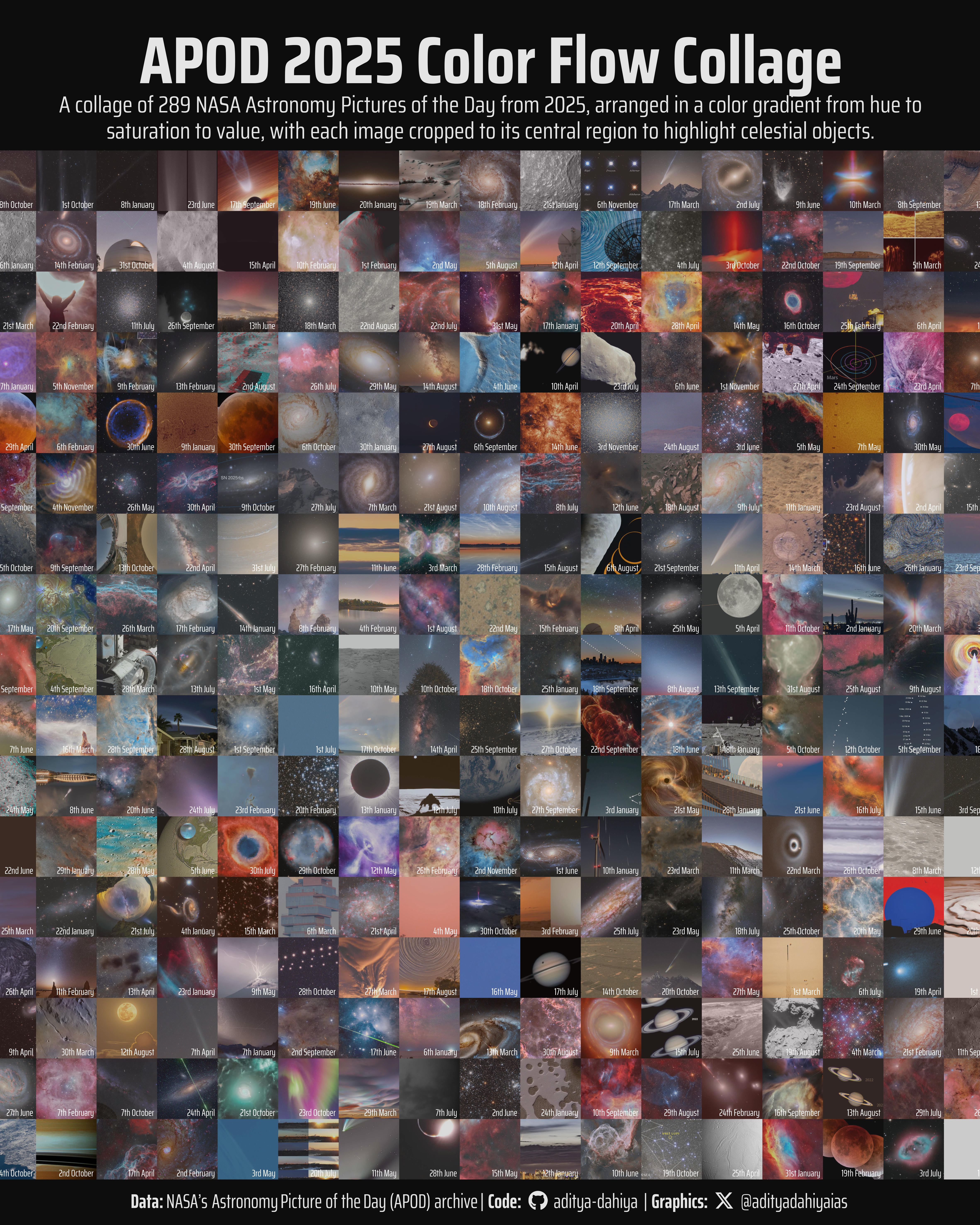
Figure 1: This visualization showcases the stunning diversity of NASA’s Astronomy Picture of the Day archive from 2025. Each image was processed to extract its central 50% area and dominant color, then arranged to create a smooth color gradient from top-left to bottom-right. The semi-transparent overlay reveals the underlying color flow pattern across the astronomical imagery.
How I Made This Graphic
Loading required libraries
Code
pacman::p_load( tidyverse, # All things tidy scales, # Nice Scales for ggplot2 fontawesome, # Icons display in ggplot2 ggtext, # Markdown text support for ggplot2 showtext, # Display fonts in ggplot2 colorspace, # Lighten and Darken colours sf, # Spatial Features patchwork, # Composing Plots packcircles, # for hierarchichal packing circles colorspace, # Modify and play with colours, extract dominant colours magick # Playing with images)apod <- readr::read_csv('https://raw.githubusercontent.com/rfordatascience/tidytuesday/main/data/2026/2026-01-20/apod.csv')
Visualization Parameters
Code
# Font for titlesfont_add_google("Saira",family ="title_font")# Font for the captionfont_add_google("Saira Condensed",family ="body_font")# Font for plot textfont_add_google("Saira Extra Condensed",family ="caption_font")showtext_auto()# A base Colourbg_col <-"grey5"seecolor::print_color(bg_col)# Colour for highlighted texttext_hil <-"grey90"seecolor::print_color(text_hil)# Colour for the texttext_col <-"grey80"seecolor::print_color(text_col)# Define Base Text Sizebts <-120# Caption stuff for the plotsysfonts::font_add(family ="Font Awesome 6 Brands",regular = here::here("docs", "Font Awesome 6 Brands-Regular-400.otf"))github <-""github_username <-"aditya-dahiya"xtwitter <-""xtwitter_username <-"@adityadahiyaias"social_caption_1 <- glue::glue("<span style='font-family:\"Font Awesome 6 Brands\";'>{github};</span> <span style='color: {text_hil}'>{github_username} </span>")social_caption_2 <- glue::glue("<span style='font-family:\"Font Awesome 6 Brands\";'>{xtwitter};</span> <span style='color: {text_hil}'>{xtwitter_username}</span>")plot_caption <-paste0("**Data:** NASA's Astronomy Picture of the Day (APOD) archive"," | **Code:** ", social_caption_1," | **Graphics:** ", social_caption_2)rm( github, github_username, xtwitter, xtwitter_username, social_caption_1, social_caption_2)plot_title <-"APOD 2025 Color Flow Collage"plot_subtitle <-"A collage of 289 NASA Astronomy Pictures of the Day from 2025, arranged in a color gradient from hue to saturation to value, with each image cropped to its central region to highlight celestial objects."|>str_wrap(110)
Exploratory Data Analysis and Wrangling
Code
bts =120# Filtered dataapod_2025 <- apod |>filter(media_type =="image") |>filter(date >=as_date("2025-01-01")) |>select(date, url, title) |>filter(!is.na(url))# Take only 289 images (17x17 = 289), to get a square numberapod_2025 <- apod_2025 |>slice(1:300)# Function to extract dominant color from an imageget_dominant_color <-function(img) {# Resize to 1x1 to get average color img_tiny <-image_scale(img, "1x1!") col <-image_data(img_tiny, channels ="rgb")rgb(col[1], col[2], col[3], maxColorValue =255)}# Function to process each image with robust error handling# Extracts central 50% to avoid borders and textprocess_image <-function(url, index =NULL) {tryCatch({if (!is.null(index)) {message(sprintf("Processing image %d: %s", index, url)) }# Read image with timeout img <-image_read(url)# Get dimensions info <-image_info(img)# Validate image was read successfullyif (info$width ==0|| info$height ==0) {message(paste("Invalid image dimensions for:", url))return(NULL) }# Calculate central 50% dimensions# This removes 25% from each side central_width <- info$width *0.5 central_height <- info$height *0.5 x_offset <- info$width *0.25 y_offset <- info$height *0.25# Crop to central 50% area img_central <-image_crop(img, geometry =geometry_area(width = central_width,height = central_height,x_off = x_offset,y_off = y_offset ))# Get info of cropped image central_info <-image_info(img_central)# Now crop that central area to a square min_dim <-min(central_info$width, central_info$height) img_square <-image_crop(img_central, geometry =geometry_area(width = min_dim,height = min_dim,x_off = (central_info$width - min_dim) /2,y_off = (central_info$height - min_dim) /2 ))# Resize to 600x600 img_resized <-image_scale(img_square, "600x600!")# Extract dominant color dominant_color <-get_dominant_color(img_resized)message(paste("✓ Successfully processed:", url))list(image = img_resized, color = dominant_color, url = url) }, error =function(e) {message(paste("✗ Error processing:", url))message(paste(" Error message:", e$message))return(NULL) })}# Process all images with progress trackingprocessed_images <-map2( apod_2025$url, seq_along(apod_2025$url), process_image,.progress =TRUE)# Filter out NULL entries and update datasetvalid_idx <-map_lgl(processed_images, ~!is_null(.x))n_failed <-sum(!valid_idx)n_success <-sum(valid_idx)message(sprintf("\n=== Processing Summary ==="))message(sprintf("Successfully processed: %d images", n_success))message(sprintf("Failed to process: %d images", n_failed))message(sprintf("Success rate: %.1f%%", (n_success/length(valid_idx))*100))processed_images <- processed_images[valid_idx]apod_2025_clean <- apod_2025[valid_idx, ]# If we have fewer than 289 images, adjust grid sizen_images <-length(processed_images)grid_size <-floor(sqrt(n_images))n_to_use <- grid_size^2message(sprintf("\nCreating %dx%d grid with %d images", grid_size, grid_size, n_to_use ) )# Take only the number we need for a perfect squareprocessed_images <- processed_images[1:n_to_use]apod_2025_clean <- apod_2025_clean[1:n_to_use, ]# Continue with the rest of the code...# Process all images (this will take some time!)message("Processing images... This may take several minutes.")# processed_images <- map(apod_2025$url, process_image, .progress = TRUE)# Remove any NULL entries (failed downloads)valid_idx <-map_lgl(processed_images, ~!is_null(.x))processed_images <- processed_images[valid_idx]apod_2025_clean <- apod_2025_clean[valid_idx, ]# Extract colors and imagescolors <-map_chr(processed_images, ~.x$color)images <-map(processed_images, ~.x$image)# Convert colors to HSV for sortingcolor_hsv <-t(rgb2hsv(col2rgb(colors)))apod_2025_clean$hue <- color_hsv[, 1]apod_2025_clean$saturation <- color_hsv[, 2]apod_2025_clean$value <- color_hsv[, 3]apod_2025_clean$color <- colors# Sort by hue, then saturation, then value for color flowapod_sorted <- apod_2025_clean |>arrange(hue, saturation, value)# Reorder images based on sortingimages_sorted <- images[match(apod_sorted$date, apod_2025$date)]# Create collagemessage("Creating collage...")n_cols <- grid_sizen_rows <- grid_size# Combine images into rowsrows <-list()for (i in1:n_rows) { start_idx <- (i -1) * n_cols +1 end_idx <-min(i * n_cols, length(images_sorted))if (start_idx <=length(images_sorted)) { row_images <- images_sorted[start_idx:end_idx] rows[[i]] <-image_append(do.call(c, row_images)) }}# Combine rows verticallycollage <-image_append(do.call(c, rows), stack =TRUE)# Save the collagemessage("Saving collage...")image_write( collage, path = here::here("data_vizs","tidy_nasa_astronomy_pics.png" ), quality =95 )# Create a ggplot2 visualization showing the color distributioncolor_grid <- apod_sorted |>slice(1:(grid_size^2)) |>mutate(row =rep(1:grid_size, each = grid_size),col =rep(1:grid_size, times = grid_size) )library(tidyverse)library(magick)library(colorspace)library(patchwork) # Optional: for better composition# First, create the actual collage image using magickmessage("Creating collage with magick...")n_cols <- grid_size # or 17 if you have exactly 289 imagesn_rows <- grid_size# Combine images into rowsrows <-list()for (i in1:n_rows) { start_idx <- (i -1) * n_cols +1 end_idx <-min(i * n_cols, length(images_sorted))if (start_idx <=length(images_sorted)) { row_images <- images_sorted[start_idx:end_idx] rows[[i]] <-image_append(do.call(c, row_images)) }}# Combine rows verticallycollage <-image_append(do.call(c, rows), stack =TRUE)image_write( collage, path = here::here("data_vizs","tidy_nasa_astronomy_pics.png" ), quality =50 )# Read the collage back for ggplot2collage_for_ggplot <-image_read( here::here("data_vizs","tidy_nasa_astronomy_pics.png" ))# First, prepare the date labels in the desired formatcolor_grid <- color_grid |>mutate(date_label =format(date, "%d") |>as.numeric() |># Add ordinal suffix (1st, 2nd, 3rd, etc.)sapply(function(d) { suffix <-case_when( d %in%c(11, 12, 13) ~"th", d %%10==1~"st", d %%10==2~"nd", d %%10==3~"rd",TRUE~"th" )paste0(d, suffix) }) |># Combine with month namepaste(format(date, "%B")) )
The Plot
Code
bts =120# Create the plot with actual images as background and color overlayg <-ggplot( color_grid, mapping =aes(x = col, y = row )) +# Add the actual collage as background using annotation_rasterannotation_raster( collage_for_ggplot,xmin =0.5, xmax = n_cols +0.5,ymin =0.5, ymax = n_rows +0.5,interpolate =TRUE ) +# Overlay with semi-transparent color tilesgeom_tile(aes(fill = color), alpha =0.3, color =NA) +# Add date labels in bottom right corner of each tilegeom_text(aes(label = date_label),hjust =1,vjust =0,nudge_x =0.45, # Position near right edgenudge_y =-0.45, # Position near bottom edgefamily ="caption_font",color ="white",size = bts /10,fontface ="plain" ) +scale_fill_identity() +scale_x_continuous(expand =c(0, 0), limits =c(0.5, n_cols +0.5)) +scale_y_continuous(expand =c(0, 0), limits =c(0.5, n_rows +0.5)) +coord_fixed() +labs(title = plot_title,subtitle = plot_subtitle,x =NULL,y =NULL,caption = plot_caption ) +theme_void(base_family ="body_font",base_size = bts *3 ) +theme(legend.position ="none",# Overalltext =element_text(margin =margin(0, 0, 0, 0, "mm"),colour = text_hil,lineheight =0.3 ),plot.title =element_text(margin =margin(10, 0, 0, 0, "mm"),lineheight =0.3,hjust =0.5,size =2* bts,face ="bold" ),plot.subtitle =element_text(margin =margin(0, 0, 3, 0, "mm"),hjust =0.5,size =0.7* bts,lineheight =0.3 ),plot.caption =element_textbox(margin =margin(5, 0, 0, 0, "mm"),hjust =0.5,halign =0.5,family ="caption_font",size = bts *0.6 ),plot.caption.position ="plot",plot.title.position ="plot",plot.margin =margin(-10, -10, -10, -10, "mm") )# Save the plotggsave(filename = here::here("data_vizs","tidy_nasa_astronomy_pics_1.png" ),plot = g,width =400,height =500,units ="mm",bg = bg_col)
Savings the thumbnail for the webpage
Code
# Saving a thumbnaillibrary(magick)# Saving a thumbnail for the webpageimage_read( here::here("data_vizs","tidy_nasa_astronomy_pics_1.png" ) ) |>image_resize(geometry ="x400") |>image_write( here::here("data_vizs","thumbnails","tidy_nasa_astronomy_pics.png" ) )
Session Info
Code
pacman::p_load( tidyverse, # All things tidy scales, # Nice Scales for ggplot2 fontawesome, # Icons display in ggplot2 ggtext, # Markdown text support for ggplot2 showtext, # Display fonts in ggplot2 colorspace, # Lighten and Darken colours sf, # Spatial Features patchwork, # Composing Plots packcircles # for hierarchichal packing circles)sessioninfo::session_info()$packages |>as_tibble() |># The attached column is TRUE for packages that were # explicitly loaded with library() dplyr::filter(attached ==TRUE) |> dplyr::select(package,version = loadedversion, date, source ) |> dplyr::arrange(package) |> janitor::clean_names(case ="title" ) |> gt::gt() |> gt::opt_interactive(use_search =TRUE ) |> gtExtras::gt_theme_espn()
Table 1: R Packages and their versions used in the creation of this page and graphics